Spaces
Apps
Templates
Create
Technology Service Catalog
All content
Space settings
Shortcuts
How-to articles
How-to articles
This trigger is hidden
Troubleshooting articles
Troubleshooting articles
This trigger is hidden
Content
Technology Service Catalog
/
/
OneDrive
/
OneDrive (Windows) - How to make OneDrive files available offline
Summarize
OneDrive (Windows) - How to make OneDrive files available offline
Marie Desir
Owned by
Marie Desir
Last updated:
Jul 23, 2019
1 min read
Loading data...
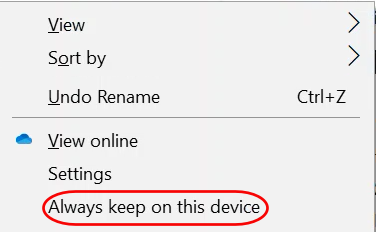
Right-click on the folder or file you want to make available offline from File Explorer
Select
Always keep on this device
Related articles
Page:
SharePoint (macOS) - How to sync shared folders
Page:
SharePoint - How to share a file in web browser
Page:
SharePoint (Windows) - How to sync shared directories
Page:
OneDrive (Windows) - Sharing files or folders in File Explorer.
Page:
How to Use FileVault
Page:
Outlook Web App - View Shared Inboxes
Page:
Webex - How to manage Webex meeting recordings
Page:
Outlook - How to grant calendar permissions in Outlook
Page:
External Sharing - How to share documents with customers outside the organization
Page:
SharePoint (Windows) - Sharing files or folders in File Explorer.
Page:
Email and Collaboration Services
What is OneDrive for Business?
{"serverDuration": 15, "requestCorrelationId": "89787db0d564429c91c36e9a895bebf8"}